Parking enforcement software
From first notice
to next action.
Stay in flow.
Give your team a clear next step. Capture vehicle details and photos, coordinate follow-ups, and keep the full enforcement record together.
- iPhone, Android and web
- Your notice types. Your timelines.
- One connected vehicle history
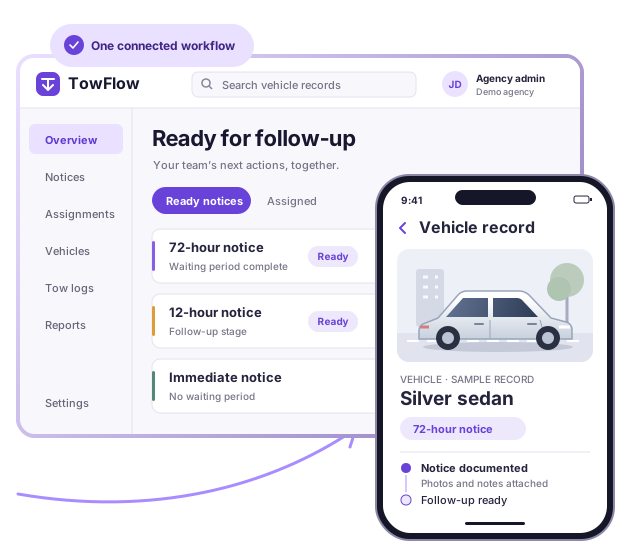
From the field to the office
Field officers
Capture the details while you’re at the vehicle.
Supervisors
See what’s ready and who’s handling it.
Administrators
Set your process. See the results.
One record.
Every step accounted for.
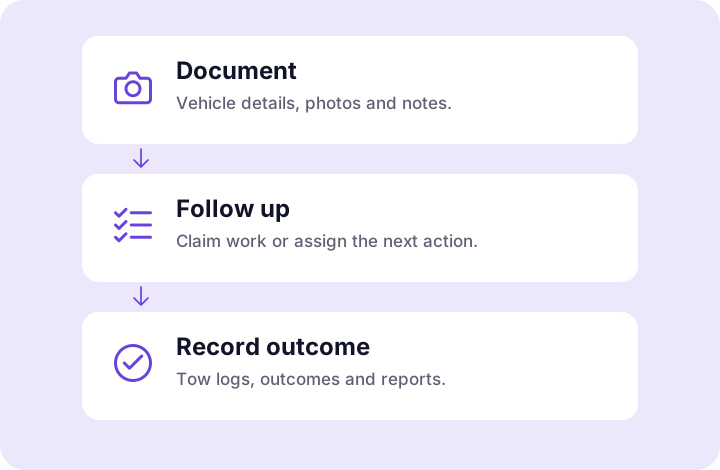
- 01
Document the vehicle
Collect the details, photos and notes your agency requires for each notice.
- 02
Know what’s next
Find notices ready for follow-up. Claim the work or assign it to an officer.
- 03
Record the outcome
Document a tow, a vehicle gone on arrival or another closure, with the history in reach.
The tools behind the work
Less piecing it together.
More moving it forward.
Keep the evidence, the next action and the outcome connected, even as work moves between people.
Get the details at the curb
Capture plates or VINs, locations, photos and notes. Prompts reflect your agency’s requirements for each notice type.
See what’s ready for follow-up
Work queues surface active notices when their waiting period is up, so your team can focus on the next action.
Make the handoff clear
Officers can claim ready work. Supervisors and administrators can assign it with notes, and the assigned officer receives a push notification.
Carry the context forward
Move to a follow-up notice on the same record. Earlier photos and notes stay available, and reports count the progression as one incident.
Find the vehicle’s history
Search by plate, VIN, address or badge. Review related notices without piecing together separate records by hand.
Turn outcomes into reports
Review weekly, monthly or month-to-date enforcement activity. Export PDF reports and print tow logs for your records.
Your process.
Built into the workflow.
Your notice periods and documentation requirements shape the work. Configure TowFlow to guide your team through them.
- Notice sources, areas and violation codes
- Notice types and waiting periods
- Required notes and photos for each notice
- Follow-up stages and tow company details
Roles and access
A shared record.
A role for everyone.
Bring field staff and office teams into the same process, with permissions managed by your agency.
Field officers
Document vehicles, claim follow-ups and record what happened on scene.
Supervisors
Review ready work and coordinate assignments across the team.
Administrators
Manage access, publish workflow changes and review enforcement reports.
Records reviewers
Find records, export reports and add case details without changing enforcement status.
Keep the context
The work moves on.
The history stays.
Agency-based access
Your team works in its own agency workspace, with access controlled through active membership and role permissions.
Evidence with a history
Photos stay with the record. When an administrator replaces a photo, the original is retained and the change is logged.
Rules that stay with the record
Update your process without rewriting the past. Existing records retain the workflow version they were created with.
Access you can manage
Deactivate a departing team member while preserving the enforcement records your agency needs.
Getting started
Start with the way
your team works.
- 1
Talk with us
Walk us through your current process and the handoffs you want to improve.
- 2
Shape your workflow
Set up notice types, waiting periods and documentation requirements for your administrator to review.
- 3
Invite your team
Give officers, supervisors and records staff the access they need through your agency administrator.
- 4
Go live
Start recording work on iPhone, Android or the web, with an in-app guide and tag-creation tutorial to help your team learn.
A few things
to know.
Can TowFlow fit our agency’s notice process?
Yes. Configure notice types, waiting periods, required notes and photos, follow-up stages and violation references. Your administrator reviews and publishes workflow changes.
Can officers use it in the field?
TowFlow runs on iPhone and Android, with a web app for desktop work. Officers can document vehicles, add photos and notes, and manage follow-ups from their mobile device.
What if an upload is interrupted?
Uploads that cannot finish are held on the device for review and retry from the pending uploads screen. Your team should check that pending items have finished uploading before relying on them being available to others.
What happens when a notice needs another stage?
A configured follow-up notice continues on the same record, keeping earlier photos and notes available. A separate vehicle interaction starts a new record. Closed records can be reopened to correct an error, with a documented reason.
What can our office team review?
Administrators can generate weekly, monthly and month-to-date enforcement reports, export PDFs and print tow logs. Records reviewers can search records, export tag and vehicle reports, and add case details without changing enforcement status.
How do pricing and setup work?
Request a demo to discuss your agency’s size, workflow, pricing and setup. We’ll walk through the process you want your team to follow.
Let’s walk through it
See your workflow
in TowFlow.
Bring your notice process. We’ll show you how it fits.